


ggpointless is an extension of the ggplot2 package
providing additional layers. These layers group into two categories:
Data transformations — geoms that fit or transform data:
geom_arch() & stat_arch() – draws a
catenary archgeom_catenary() & stat_catenary() –
draws a catenary curvegeom_chaikin() & stat_chaikin() –
smooths paths using Chaikin’s corner cutting algorithmgeom_fourier() & stat_fourier() – fits
a Fourier series to x/y observationsgeom_gridline() – gridlines as a layer (drawn above
other geoms)geom_lexis() & stat_lexis() – draws a
Lexis diagramgeom_pointless() & stat_pointless() –
emphasises selected observations with pointsVisual effects — purely aesthetic layers that change how data looks
without transforming it. The following layers are mostly drop-in
replacements for their ggplot2 counterparts. They add
visual flair like alpha gradients but no statistical transformation:
geom_abline_fade() / geom_hline_fade() /
geom_vline_fade()geom_area_fade()geom_col_fade() / geom_bar_fade()geom_density_fade()geom_freqpoly_fade()geom_histogram_fade()geom_path_fade() / geom_line_fade() /
geom_step_fade()geom_point_glow()geom_rect_fade()geom_ridgeline_fade() /
geom_ridgeline_density_fade() /
geom_ridgeline_freqpoly_fade() /
geom_ridgeline_histogram_fade()geom_segment_fade() /
geom_curve_fade()geom_unit_bar() / geom_unit_col() –
isotype / unit bar chartsgeom_unit_histogram() – isotype / unit histogramSee the Examples article for more examples.
ggpointless requires R ≥ 4.2 and
ggplot2 ≥ 4.0.0. You can install it from CRAN with:
install.packages("ggpointless")The chunk below sets a colour palette so the README plots share a consistent look. It’s not required; only the look of your plots will differ.
library(ggplot2)
library(ggpointless)

# Brand palette -- kept in sync with the vignette
cols <- c("#311dfc", "#a84dbd", "#d77e7b", "#f4ae1b")
theme_set(
  theme_minimal() +
    theme(
      legend.position           = "bottom",
      geom                      = element_geom(fill = cols[1]),
      palette.fill.discrete     = cols,
      palette.colour.discrete   = cols,
      palette.fill.continuous   = cols,
      palette.colour.continuous = cols
    )
)set.seed(5)
df_catenary <- data.frame(x = 1:4, y = sample(4))
ggplot(df_catenary, aes(x, y)) +
geom_catenary() +
geom_point(size = 3)
ggplot(df_catenary, aes(x, y)) +
  geom_catenary(
    sag = c(2, .5, NA),
    chain_length = c(NA, 4, 6)) +
  geom_point(size = 3)
#> Both `sag` and `chain_length` supplied for 1 segment; using `sag`.
#> This message is displayed once every 8 hours.
ggplot(df_catenary, aes(x, y)) +
  geom_arch(
    arch_height = c(1.5, NA, 0.5),
    arch_length = c(NA, 6, NA)
    ) +
  geom_point(size = 3)
lst <- list(
  data = list(
    whale = data.frame(x = c(.5, 4, 4, 3.5, 2), y = c(.5, 1, 1.5, .5, 3)),
    closed_square = data.frame(x = c(0, 0, 1, 1), y = c(2, 3, 3, 2)),
    open_triangle = data.frame(x = c(3, 3, 5), y = c(2, 3, 3)),
    closed_triangle = data.frame(x = c(3.5, 5, 5), y = c(0, 0, 1.5))
  ),
  color = cols,
  mode = c("closed", "closed", "open", "closed")
)

ggplot(mapping = aes(x, y)) +
  lapply(lst$data, \(i) {
    geom_polygon(data = i, fill = NA, linetype = "12", color = "#333333")
  }) +
  Map(f = \(data, color, mode) {
    geom_chaikin(data = data, color = color, mode = mode)
  }, data = lst$data, color = lst$color, mode = lst$mode) +
  geom_point(data = data.frame(x = 1.5, y = 1.5)) +
  coord_equal()
x_d <- seq(0, 4 * pi, length.out = 15)
df_d <- data.frame(
  x = x_d,
  y = sin(x_d) + x_d * 0.4 + rnorm(15, sd = 0.2)
)

p <- ggplot(df_d, aes(x, y)) +
  geom_point(alpha = 0.35)
p + geom_fourier()
p +
  geom_fourier(
    aes(colour = "detrend = NULL"),
    n_harmonics = 3
  ) +
  geom_fourier(
    aes(colour = "detrend = \"lm\""),
    n_harmonics = 3,
    detrend = "lm"
  )
ggplot(mpg, aes(class)) +
  geom_bar() +
  geom_gridline()
p <- ggplot(mpg, aes(y = class)) +
  geom_bar() +
  geom_gridline(grids = "x")

# geom_gridline inherits its line properties from theme
p + theme(panel.grid = element_line(colour = "white"))
# The x/y positions are deducted from the scale(s)
p + scale_x_sqrt()
# You can overwrite these properties of course
p +
  geom_gridline(grids = "x", colour = cols[4], linewidth = 1.5) +
  scale_x_sqrt(breaks = c(10, 20, 30, 40, 50))
df_lexis <- data.frame(
  key = c("A", "B", "B", "C", "D"),
  x = c(0, 1, 6, 5, 6),
  xend = c(5, 4, 10, 8, 10)
)

ggplot(df_lexis, aes(x = x, xend = xend, color = key)) +
  geom_lexis(aes(linetype = after_stat(type)), size = 2) +
  coord_equal() +
  scale_x_continuous(breaks = c(df_lexis$x, df_lexis$xend)) +
  scale_linetype_identity() +
  theme(panel.grid.minor = element_blank())
sunspot_df <- data.frame(
  year = time(datasets::sunspot.year),
  sunspots = unclass(datasets::sunspot.year)
)
ggplot(tail(sunspot_df, 12), aes(year, sunspots)) +
  geom_step(colour = cols[4]) +
  geom_pointless(location = c("first", "last"), size = 3, colour = cols[4])
set.seed(42)
df_fade <- data.frame(
  x = seq_len(60),
  y = cumsum(rnorm(60, sd = 0.35))
)

p <- ggplot(df_fade, aes(x, y))
p + geom_area_fade()
ggplot(iris, aes(Sepal.Length)) +
  geom_freqpoly_fade(alpha = 0, alpha_fade_to = 1)
#> `stat_bin()` using `bins = 30`. Pick better value `binwidth`.
dmn <- list(
  month.abb,
  time(datasets::nottem) |> floor() |> unique()
)
df_nottem <- datasets::nottem |>
  matrix(data = _, 12, dimnames = dmn) |>
  as.data.frame() |>
  stack() |>
  cbind(month = factor(month.abb, levels = month.abb))

p <- ggplot(df_nottem, aes(x = values, group = month, fill = after_stat(x))) +
  labs(
    x = NULL,
    y = NULL,
    caption = "Average air temperatures at Nottingham Castle in degrees Fahrenheit (1920–1939)"
  ) +
  guides(fill = "none") +
  scale_x_continuous(expand = 0)

p + geom_density_fade(
  outline.type = "none"
  )
p <- p + aes(y = month)
p + geom_ridgeline_density_fade(
  alpha_scope = "global",
  outline.type = "none"
  )
#> ℹ Using auto-computed `scale = 6.5`.
#> • Pass an explicit `scale` to override.
p + geom_ridgeline_freqpoly_fade(
  alpha_scope = "global",
  linewidth = 0.25
  )
#> ℹ Using auto-computed `scale = 0.2`.
#> • Pass an explicit `scale` to override.
p + geom_ridgeline_histogram_fade(
  alpha_scope = "group",
  bins = 40,
  linewidth = 0.25
  )
#> ℹ Using auto-computed `scale = 0.29`.
#> • Pass an explicit `scale` to override.
anscombe_long <- reshape(anscombe, varying = TRUE, sep = "", direction = "long", timevar = "tv")
ggplot(anscombe_long, aes(x, y)) +
  geom_point_glow(colour = cols[1]) +
  facet_wrap(~tv) +
coord_equal(clip = "off") 
b <- ggplot(mtcars, aes(wt, mpg)) +
  geom_point()

df <- data.frame(x1 = 2.62, x2 = 3.57, y1 = 21.0, y2 = 15.0)
b +
  geom_curve_fade(
    aes(x = x1, y = y1, xend = x2, yend = y2, colour = "curve"),
    arrow = arrow(),
    data = df
  ) +
  geom_segment_fade(
    aes(x = x1, y = y1, xend = x2, yend = y2, colour = "segment"),
    data = df
  )
theta <- seq(1.3, -1.3, length.out = 101)
ichthys <- data.frame(
  x = theta^2,
  y = 0.5 * theta * (theta^2 - 1)
)

ggplot(ichthys, aes(x, y)) +
  geom_path_fade(
    linewidth = 1.5,
    fade_direction = c("start", "end"),
    alpha_mode = "gradient"
  ) +
  coord_fixed()
p <- ggplot() +
  geom_abline_fade(intercept = 0, colour = "#a84dbd", linewidth = 1) +
  geom_hline_fade(yintercept = 1, colour = "#d77e7b", linewidth = 1) +
  geom_vline_fade(xintercept = 1, colour = "#f4ae1b", linewidth = 1) +
  xlim(0, 2) +
  ylim(0, 2)

p
p + coord_polar()
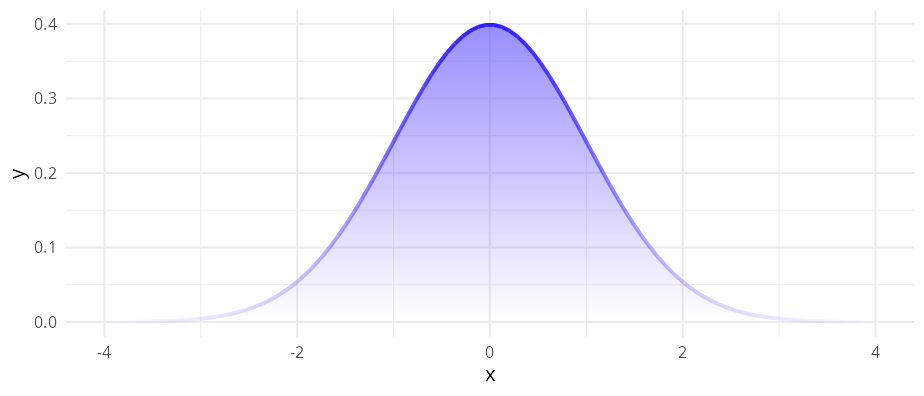
ggplot() +
  stat_function(
    alpha = 0.5,
    fun = dnorm,
    n = 100,
    xlim = c(-4, 4),
    geom = "area_fade",
    outline.type = "none" # remove solid outline
  ) +
  # Add fading outline instead
  stat_function(
    fun = dnorm, n = 100,
    xlim = c(-4, 4),
    geom = "line_fade",
    colour = cols[1],
    linewidth = 1,
    fade_direction = c("start", "end")
  )
ggplot(head(economics, 25), aes(date, unemploy)) +
  geom_step_fade(alpha_fade_to = 0.1)
ggplot(head(economics, 25), aes(date, unemploy)) +
  geom_rect_fade(
    data = data.frame(
      xmin = as.Date("1968-07-01"),
      xmax = as.Date("1969-07-01"),
      ymin = -Inf, ymax = 2800
    ),
    inherit.aes = FALSE,
    alpha = 0,
    alpha_fade_to = 0.3,
    aes(xmin = xmin, xmax = xmax, ymin = ymin, ymax = ymax)
  ) +
  geom_step_fade(alpha_fade_to = 0.1)
ggplot(mpg, aes(y = class)) +
  geom_bar_fade()
ggplot(datasets::BOD, aes(Time, demand)) +
  geom_col_fade(
    radius = unit(10, "pt"),
    alpha = 0.75,
    alpha_fade_to = 0.25,
    alpha_scope = "global"
    )
ggplot(faithful, aes(eruptions)) +
geom_histogram_fade(
alpha = 0.8,
alpha_fade_to = 0.1,
alpha_scope = "global"
) +
geom_step(
stat = "bin",
direction = "mid",
colour = cols[1]
)
#> `stat_bin()` using `bins = 30`. Pick better value `binwidth`.
#> `stat_bin()` using `bins = 30`. Pick better value `binwidth`. ### Unit bar charts and histograms
bins <- 30
bw <- diff(range(faithful$eruptions)) / bins

ggplot(faithful, aes(eruptions)) +
  geom_unit_histogram(
    aes(fill = after_stat(x)),
    radius = unit(1, "pt"),
    bins = bins
  ) +
  labs(
    y = NULL
  ) +
  guides(fill = "none") +
  scale_x_continuous(
    breaks = 2:5,
    labels = paste(2:5, "min")
  ) +
  coord_equal(ratio = 1/3 * bw, clip = "off") +
  theme(
    panel.grid.minor = element_blank(),
    panel.grid.major.x = element_blank(),
    axis.ticks    = element_blank()
  )
cs <- 100
ggplot(diamonds, aes(y = cut, fill = color)) +
  geom_unit_bar(
    cell_size = cs,
    radius = unit(1, "pt"),
    position = "dodge"
    ) +
  labs(
    x = NULL,
    y = NULL,
    caption = sprintf("One cell equals %d observations.", cs)) +
  coord_equal(ratio = 7 * cs) +
  theme_minimal()
#> ! `radius` of 1 pt exceeds the largest displayable corner radius for the
#>   rendered shape.
#> ℹ Maximum displayable radius is 0.52 pt; falling back to that.
The geom_unit_* family was inspired by the work of pudding.cool.
Visual effects can quietly exclude readers. The faded end of any
gradient geom drops below WCAG
contrast thresholds for low-vision readers. Pair colour with
linetype, shape, or labels for categorical
encodings; prefer colour-vision-deficiency-safe (CVD-safe) palettes like
scale_colour_viridis_d() or Okabe–Ito; and raise
alpha_fade_to when the faded region carries data your
readers need to find.
The 4-stop palette cols used in this README and the
Examples article is monotonic in luminance, so it survives greyscale
conversion and the stop ordering is preserved under CVD. The middle hues
collapse under deuteranopia, however, so for cases where hue identity
carries information rather than ordering, prefer
scale_fill_viridis_c() /
scale_colour_viridis_c().
The 2D gradients used by geom_area_fade() and friends
depend on Porter-Duff compositing1, a
feature of R’s graphics engine added in R 4.2. When the active device
does not support compositing (e.g. grDevices::pdf()), the
fade family falls back to a single-colour vertical fade — the horizontal
colour gradient is lost, only the vertical alpha fade survives, and a
one-time message is emitted:
!
geom_area_fade(): the graphics device does not support gradient fills. Thefillcolour gradient is replaced by a single colour. Switch to a device that supports gradients (e.g.ragg::agg_png(),svg(),cairo_pdf()) for the full effect. This message is displayed once per session.
Most modern raster devices — including ragg::agg_png()
and the Cairo-backed png() shipped on Linux and macOS —
do support compositing, so the 2D gradient works out of the
box. In RStudio, go to Tools > Global Options > Graphics >
Backend and select AGG to ensure full support.
Please note that this project is released with a Contributor Code of Conduct. By participating in this project you agree to abide by its terms.